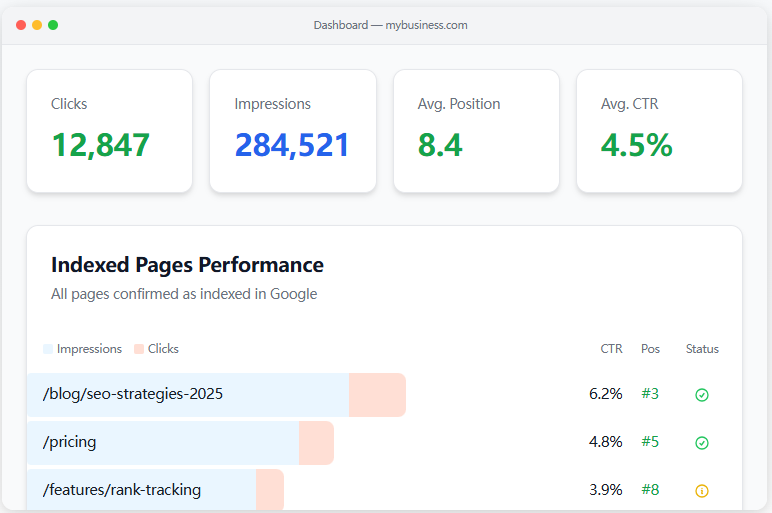
Rank Higher, Grow Faster

Rank, discover, and showcase the small products that matter most.

Top Projects Launching Today

New launches in
00h
:
00m
:
00s
VPSRated logo

VPSRated is an independent and comprehensive hosting comparison platform designed to help developers, businesses, and individuals find the best hosting services. It meticulously reviews and ranks over 120 VPS, VDS, RDP, dedicated, GPU, VPN, and proxy providers across 7 distinct categories, ensuring users make informed decisions based on objective data rather than marketing hype. Key Features Independent Rankings: Rankings are based on real benchmarks and verified user reviews, not affiliate payouts. Real Benchmarks: Every provider undergoes identical sysbench, fio, and iperf3 tests with publicly available methodology. Verified Reviews: Features 974+ reviews from real users, publishing both praise and criticism. Quarterly Audits: Top providers are re-benchmarked every quarter to ensure up-to-date accuracy. Comprehensive Coverage: Indexes 323+ plans from 84+ providers across 7 hosting categories. Exclusive Deals: Offers exclusive discounts and coupons from partner hosts, updated weekly. Use Cases For developers, VPSRated is an invaluable resource for identifying production-ready Linux KVM VPS for web apps and APIs, or high-performance GPU cloud instances (H100, A100, RTX 4090) for AI/ML training and inference. The platform's detailed benchmarks help ensure optimal performance for demanding development environments. Businesses can leverage VPSRated to compare Virtual Dedicated Servers (VDS) for predictable performance with dedicated CPU cores, or Bare Metal Dedicated Servers for heavy workloads and compliance-regulated use cases. It also assists in finding Windows RDP solutions for trading bots, automation, and remote work, ensuring full admin access and low latency. Individuals and teams focused on privacy and security can explore audited no-logs VPN services with features like WireGuard and kill switches, or browse proxy providers offering residential, datacenter, and mobile IPs for various online needs. The platform simplifies the process of finding reliable and secure infrastructure. Pricing Information Using VPSRated as a comparison platform is free for users. The platform helps users find the cheapest plans and exclusive deals from various hosting providers, allowing them to save up to 80% on their hosting costs. While the listed services are paid, VPSRated itself does not charge for its comparison and review services. User Experience and Support VPSRated offers a professional and easy-to-navigate interface, allowing users to browse by category, compare plans, and access detailed reviews and guides. The platform's commitment to editorial independence and transparent methodology builds trust. While direct support for the comparison platform isn't explicitly detailed, the "Contact" link and community review system suggest avenues for engagement and feedback. Technical Details The platform's core strength lies in its rigorous, objective testing methodology. It employs industry-standard benchmarks like sysbench for CPU/memory, fio for storage I/O, and iperf3 for network performance. This data-driven approach ensures that rankings are based on measurable performance metrics, providing a reliable foundation for comparisons. Pros Truly independent and unbiased rankings. Extensive range of hosting categories covered. Transparent and public benchmarking methodology. High volume of verified, real-user reviews. Regular audits keep information current and accurate. Offers exclusive deals and coupons. Cons The platform's own tech stack is not explicitly detailed. No direct hosting services are offered by VPSRated itself. Users must still visit provider sites to finalize purchases. "Cheapest plan" prices are subject to change on provider sites. Conclusion VPSRated stands out as a highly reliable and transparent resource for anyone seeking to navigate the complex world of hosting services. By providing data-backed comparisons, verified reviews, and exclusive deals, it empowers users to make optimal choices for their specific workloads. Visit VPSRated today to compare hosting that actually fits your needs and budget.

Attenly logo

Attenly helps college students stop calculating attendance manually. Add your weekly timetable, mark classes, manage assignments, plan safe skips, and instantly see subject-wise attendance, classes needed to stay safe, and how many classes you can miss without dropping below your target. Built by a student for real college life.

TruStar Connect logo

TruStar Connect is an AI-powered, comprehensive safety and operations platform designed to streamline and manage an entire safety program in one place. It empowers Canadian crews, from single SECOR contractors to large enterprise operations, to run incident investigations, inspections, permits, crew scheduling, daily reports, and more with intelligent automation and full offline support. Key Features AI-Powered Incident Investigation: Guided investigations with AI root cause analysis, including an independent bias audit, to identify systemic issues beyond individual error. Comprehensive Safety Program Management: Integrates inspections, forms, permits, crew scheduling, training, documents, equipment tracking, and corrective actions into a single platform. Full Offline Support: Crews can complete all tasks, forms, and permits without an internet connection, with automatic syncing once back in range. COR & SECOR Readiness: Provides a live readiness estimate against audit standards, ensuring compliance and preventing surprises on audit day. AI Drafting & Automation: AI assists with building forms, drafting policies, suggesting controls for hazards, and analyzing evidence, significantly reducing administrative burden. TruStar One Card: Digital training cards with QR codes for instant verification of worker certifications on-site. Use Cases TruStar Connect is invaluable for organizations in high-risk industries such as Construction, Oil & Gas, Energy, Industrial, Trades, and Manufacturing. It simplifies compliance for Canadian COR and SECOR standards by automatically building an audit-ready paper trail from daily operations, ensuring nothing falls through the cracks. Teams can leverage the platform for proactive safety management, from issuing and tracking permits to work (hot work, confined space, LOTO) to managing equipment maintenance schedules and tracking worker certifications. Its AI-driven investigation tools provide deeper insights into incidents, moving beyond superficial fixes to address true organizational and leadership factors, thereby fostering a stronger safety culture. Pricing Information TruStar Connect offers transparent, tiered pricing based on the number of workers, eliminating the need for sales calls to get a quote. Plans range from Starter (up to 10 workers at $175 CAD/mo) to Growth (11-50 workers at $475 CAD/mo) and Pro (51-150 workers at $1,099 CAD/mo), with custom Enterprise pricing for 150+ workers. Every plan includes the entire platform, and a 14-day free trial with full access is available without requiring a credit card. User Experience and Support The platform boasts a consistent user experience across all devices, whether online or offline, making it accessible for field crews. Its intuitive interface surfaces critical information like open incidents, overdue inspections, and corrective actions at a glance. The AI is designed to assist, not replace, ensuring users remain in control while benefiting from accelerated research, drafting, and analysis. The "Knowledge Base" is listed as a resource, implying documentation and support. Technical Details TruStar Connect is built for robust performance in challenging environments, featuring full offline mode capabilities that ensure continuous operation even without an internet connection. The platform heavily integrates advanced AI for tasks such as root cause analysis, form generation, policy drafting, and evidence comparison, making it a cutting-edge solution for safety management. While specific programming languages are not mentioned, its cross-device compatibility and offline functionality suggest a modern web and mobile application architecture. Pros and Cons Pros: Most complete safety and operations platform, consolidating multiple tools. Advanced AI for root cause analysis with bias audit and drafting capabilities. Full offline functionality for remote and disconnected work sites. Built specifically for Canadian COR and SECOR readiness. Transparent, worker-based pricing model. Supports multiple investigation frameworks (TruStar Method, SCAT, ICAM, HFACS, 5 Whys, Bowtie). Cons: Comprehensive feature set might have a learning curve for new users. No specific cons mentioned in the provided text, indicating a strong value proposition. Requires commitment to a unified platform for maximum benefit. Conclusion TruStar Connect offers an unparalleled, all-in-one solution for safety and operational management, leveraging AI to reduce administrative burden and enhance decision-making. Its focus on Canadian compliance, offline capabilities, and transparent pricing makes it an ideal choice for organizations seeking to elevate their safety program. Explore TruStar Connect's 14-day free trial to experience a truly integrated and intelligent safety management system.

4
sadiqbd logo

sadiqbd Platform offers a comprehensive collection of over 100 free, browser-based online tools designed for a wide range of personal and professional tasks. This SaaS eliminates the need for sign-ups or subscriptions, providing instant access to powerful utilities across finance, health, development, SEO, and everyday needs. It caters to a diverse audience including individuals managing personal finances, students, engineers, writers, developers, IT professionals, and SEO marketers, offering quick and reliable solutions for various challenges. Key Features: 100+ Free Tools: Access to a vast library covering finance, health, development, SEO, text, and unit conversions. No Barriers: Completely free, no sign-up, subscription, or installation required. Instant & Browser-Based: All tools run directly in your browser, delivering immediate results. Financial & Health Calculators: Comprehensive tools for EMI, SIP, FD, RD, Retirement, BMI, BMR, and Calorie Intake. Developer & IT Utilities: JSON formatter, Base64 encoder/decoder, URL encoder, JWT decoder, Regex tester, DNS lookup, Port Scanner. SEO & Content Aids: SERP preview, Meta Tag Generator, Keyword Density checker, XML Sitemap Generator, and Text Reverser. Use Cases: Financial Planning: Users can plan investments and loans with precision using various calculators, ideal for personal finance or small business projections. Development & Debugging: Developers can streamline workflows by formatting JSON, encoding data, testing regex, or diagnosing network issues. Content Creation & SEO: Writers and SEO specialists can transform and analyze text, audit website visibility, and optimize for search engines with dedicated tools. Pricing Information: sadiqbd Platform operates on a completely free model. All 100+ tools are available without any cost, subscriptions, or hidden fees, making it an accessible resource for everyone. User Experience and Support: The platform emphasizes ease of use, with all tools running directly in the browser and providing instant results without installations or account creation. While dedicated customer support isn't explicitly mentioned, the blog offers insightful articles explaining tool utility. Technical Details: The tools are designed to run efficiently within a web browser environment, primarily utilizing client-side technologies like HTML, CSS, and JavaScript for broad accessibility. Pros and Cons: Pros: 100+ diverse free tools, no sign-up/subscription, browser-based, instant results, user-friendly. Cons: No explicit dedicated support, advanced features not detailed, no native mobile apps. Conclusion: sadiqbd Platform is an exceptional resource for quick, reliable, and free online utilities across numerous domains. Its commitment to accessibility and a vast array of tools makes it an invaluable asset for both personal and professional use. Explore sadiqbd Platform today to simplify your daily tasks!

Blogy logo

Blogy is your AI-powered content automation platform that researches, writes, optimizes, and publishes content designed to rank on Google and AI search engines. Acting as your virtual CMO, Blogy helps you drive organic growth on autopilot without building a content team.

TruStar Connect logo

TruStar Connect is an AI-powered, comprehensive safety and operations platform designed to streamline and manage an entire safety program in one place. It empowers Canadian crews, from single SECOR contractors to large enterprise operations, to run incident investigations, inspections, permits, crew scheduling, daily reports, and more with intelligent automation and full offline support. Key Features AI-Powered Incident Investigation: Guided investigations with AI root cause analysis, including an independent bias audit, to identify systemic issues beyond individual error. Comprehensive Safety Program Management: Integrates inspections, forms, permits, crew scheduling, training, documents, equipment tracking, and corrective actions into a single platform. Full Offline Support: Crews can complete all tasks, forms, and permits without an internet connection, with automatic syncing once back in range. COR & SECOR Readiness: Provides a live readiness estimate against audit standards, ensuring compliance and preventing surprises on audit day. AI Drafting & Automation: AI assists with building forms, drafting policies, suggesting controls for hazards, and analyzing evidence, significantly reducing administrative burden. TruStar One Card: Digital training cards with QR codes for instant verification of worker certifications on-site. Use Cases TruStar Connect is invaluable for organizations in high-risk industries such as Construction, Oil & Gas, Energy, Industrial, Trades, and Manufacturing. It simplifies compliance for Canadian COR and SECOR standards by automatically building an audit-ready paper trail from daily operations, ensuring nothing falls through the cracks. Teams can leverage the platform for proactive safety management, from issuing and tracking permits to work (hot work, confined space, LOTO) to managing equipment maintenance schedules and tracking worker certifications. Its AI-driven investigation tools provide deeper insights into incidents, moving beyond superficial fixes to address true organizational and leadership factors, thereby fostering a stronger safety culture. Pricing Information TruStar Connect offers transparent, tiered pricing based on the number of workers, eliminating the need for sales calls to get a quote. Plans range from Starter (up to 10 workers at $175 CAD/mo) to Growth (11-50 workers at $475 CAD/mo) and Pro (51-150 workers at $1,099 CAD/mo), with custom Enterprise pricing for 150+ workers. Every plan includes the entire platform, and a 14-day free trial with full access is available without requiring a credit card. User Experience and Support The platform boasts a consistent user experience across all devices, whether online or offline, making it accessible for field crews. Its intuitive interface surfaces critical information like open incidents, overdue inspections, and corrective actions at a glance. The AI is designed to assist, not replace, ensuring users remain in control while benefiting from accelerated research, drafting, and analysis. The "Knowledge Base" is listed as a resource, implying documentation and support. Technical Details TruStar Connect is built for robust performance in challenging environments, featuring full offline mode capabilities that ensure continuous operation even without an internet connection. The platform heavily integrates advanced AI for tasks such as root cause analysis, form generation, policy drafting, and evidence comparison, making it a cutting-edge solution for safety management. While specific programming languages are not mentioned, its cross-device compatibility and offline functionality suggest a modern web and mobile application architecture. Pros and Cons Pros: Most complete safety and operations platform, consolidating multiple tools. Advanced AI for root cause analysis with bias audit and drafting capabilities. Full offline functionality for remote and disconnected work sites. Built specifically for Canadian COR and SECOR readiness. Transparent, worker-based pricing model. Supports multiple investigation frameworks (TruStar Method, SCAT, ICAM, HFACS, 5 Whys, Bowtie). Cons: Comprehensive feature set might have a learning curve for new users. No specific cons mentioned in the provided text, indicating a strong value proposition. Requires commitment to a unified platform for maximum benefit. Conclusion TruStar Connect offers an unparalleled, all-in-one solution for safety and operational management, leveraging AI to reduce administrative burden and enhance decision-making. Its focus on Canadian compliance, offline capabilities, and transparent pricing makes it an ideal choice for organizations seeking to elevate their safety program. Explore TruStar Connect's 14-day free trial to experience a truly integrated and intelligent safety management system.

4
MyToolStudio logo

MyToolStudio is a comprehensive, browser-first online toolkit offering over 250 free utilities for modern web professionals. Designed for developers, SEO specialists, and designers, it provides a vast array of tools without the need for sign-ups, paywalls, or intrusive ads, emphasizing speed and user privacy. Key Features Extensive Toolkit: Access 250+ tools across 14 categories, including JSON, schema, image, PDF, color, and text utilities. Technical SEO + AI Audit: Conduct in-depth audits for up to 2,000 pages, covering broken links, schema, security, PageSpeed, llms.txt, and AI search readiness. Privacy-First Design: Most tools run entirely in your browser, ensuring your files and data never touch MyToolStudio's servers. Genuinely Fast Performance: Operations complete in milliseconds as they are processed on your device, eliminating upload queues and waiting times. Free Forever: Enjoy unlimited access to all tools and features with no paywalls, trials, or daily usage limits. URL-Aware SEO Tools: Smart SEO tools automatically pre-fill forms by detecting meta tags, schema markup, Open Graph data, and FAQs from your pasted URLs. Use Cases MyToolStudio caters to a diverse audience with specialized workflows. Developers can streamline their tasks with tools for JSON formatting, validation, minification, regex testing, JWT decoding, and various code converters. These utilities help in debugging, data manipulation, and ensuring code quality efficiently. SEO professionals will find invaluable resources for optimizing website visibility. The platform offers tools for meta tag generation and analysis, schema markup creation (including Article, Product, FAQ, LocalBusiness, and VideoObject schemas), sitemap generation, robots.txt management, and comprehensive technical SEO audits. The AI optimization audit provides insights into both classic SEO and AI search readiness. Designers benefit from a suite of tools for color management, image processing, and asset creation. This includes color pickers, palette generators, contrast checkers, image compressors, resizers, converters (JPG to PNG, SVG to PNG), background removers, and favicon generators. Additionally, webmasters and general users can utilize file transfer services (up to 2 GB), PDF manipulation tools (merge, split, compress, convert), and various text utilities like character counters and line removers. Pricing Information MyToolStudio operates on a completely free model. There are no paywalls, no trials, no daily limits, and no "Pro" tiers. Every tool and every feature is available to everyone at no cost, with no ads within the tool UI. User Experience and Support The platform is built browser-first, ensuring a genuinely fast and responsive user experience. Tools operate locally on your device, eliminating server-side delays and providing instant results. The interface is designed for ease of use, allowing users to quickly find and utilize the required tool. While direct support channels aren't explicitly mentioned, an optional newsletter is available for users who wish to stay updated on new tool launches and behind-the-scenes insights. Technical Details A core technical principle of MyToolStudio is client-side processing. The vast majority of its tools execute entirely within the user's web browser, meaning sensitive files and data never leave the user's device or touch MyToolStudio's servers. For the few tools that require server-side assistance, data is used solely to fulfill the request and is immediately discarded, ensuring a high level of privacy and security. Pros and Cons Pros: Completely free with no hidden costs or paywalls. No sign-up or account required for any tool. Strong emphasis on user privacy (most tools run client-side). Exceptional speed due to local processing. Comprehensive collection of over 250 tools across diverse categories. URL-aware SEO tools automate data input. Clean, ad-free tool interface. Cons: No explicit mention of dedicated customer support channels. Limited information on the specific underlying client-side frameworks/languages used. The sheer number of tools might initially overwhelm new users, though categories help. Conclusion MyToolStudio stands out as an unparalleled free online toolkit, offering a vast array of high-quality, privacy-focused, and incredibly fast utilities for web professionals. Its commitment to being genuinely free, browser-first, and ad-free makes it an essential resource. Explore MyToolStudio today to enhance your development, SEO, and design workflows with ease and efficiency.

Yesterday's Launches

ToolsForges logo

ToolsForges is a dynamic SaaS platform designed to empower fast-moving operators with an extensive collection of business tools. It offers a comprehensive suite of calculators, text generators, and SEO tools aimed at streamlining operations and boosting efficiency. This platform is specifically tailored for business operators, marketers, content creators, and anyone needing quick, accessible tools to accelerate their daily tasks and strategic initiatives. Key Features Extensive collection of 62 free business tools. Specialized calculators for various business needs. Advanced text generators for content creation and communication. Robust SEO tools to enhance online visibility and performance. Designed for speed and operational efficiency. Regular updates and additions to the tool library. Use Cases ToolsForges proves invaluable in numerous business scenarios. For marketing professionals, the SEO tools can quickly analyze keywords, generate meta descriptions, or audit website performance, saving hours of manual effort. Content creators can leverage text generators to draft compelling headlines, product descriptions, or social media posts, ensuring a consistent flow of engaging material. Beyond marketing and content, operators can utilize the diverse calculators for financial planning, project management, or data analysis, making informed decisions rapidly. Whether it's a startup founder needing to quickly validate an idea, a small business owner optimizing their online presence, or a large enterprise team seeking to enhance productivity, ToolsForges provides immediate solutions to common operational challenges, fostering a culture of agility and responsiveness. Pricing Information ToolsForges operates on a freemium model, offering a substantial collection of 62 free tools to get users started immediately. For advanced features, higher usage limits, or premium tools, an "Upgrade" option is available, indicating paid subscription tiers. Specific pricing details for these upgraded plans are not provided but suggest a value-driven approach for serious operators. User Experience and Support While specific details on user experience and support are not provided, the emphasis on "operators who move fast" suggests an intuitive, user-friendly interface designed for quick adoption and minimal learning curve. The platform likely prioritizes ease of access and straightforward functionality to ensure users can leverage tools without extensive training. Technical Details The provided information does not specify the underlying programming languages, frameworks, or technologies used for ToolsForges. However, as a modern SaaS platform offering web-based tools, it is built to be accessible via standard web browsers, ensuring broad compatibility and ease of deployment for its users. Pros and Cons Pros: Access to 62 free, high-quality business tools. Boosts productivity and operational speed. Diverse range of calculators, text generators, and SEO tools. Ideal for fast-moving operators and businesses. Potential for cost savings by consolidating multiple tool needs. Cons: Specific advanced features might require a paid upgrade. Lack of detailed information on user support and technical stack. May require exploration to find the most suitable tools among the 62. Customization options are not explicitly mentioned. Conclusion ToolsForges stands out as an indispensable resource for any operator seeking to enhance efficiency and accelerate business processes. With its extensive suite of free and premium tools, it empowers users to achieve more in less time. Explore ToolsForges today to unlock your operational potential and move faster than ever before.

22
PASSR logo

PASSR is Flytebit's engineering intelligence platform for continuous code review and quality governance. It is built around four core dimensions: Performance, Availability, Security, and Scalability. Instead of periodic scans, PASSR runs recursively through webhook and CI/CD triggers, so every code change is reviewed as it happens.At the center of the platform is PR Agent, an autonomous background reviewer for pull requests and commits. It evaluates changes in context and sends structured findings into the PASSR portal for tracking, triage, and resolution.CapabilitiesContinuous PR and commit review: Reviews every pull request and standalone commit automatically.8-category analysis model: Covers PASSR dimensions (Performance, Availability, Security, Scalability) plus architecture, code quality, testing, and error handling.Structured issue anatomy: Every finding includes a clear problem statement, risk impact, and a ready-to-apply fix suggestion.Incremental re-review: Re-checks only changed code on new pushes and auto-resolves fixed findings.PR workflow automation: Generates PR descriptions, applies labels, and supports merge safeguards for critical open issues.Portal-level analytics: Tracks fix rates, severities, PR timelines, and cross-repo quality trends in one view.Platform support: Works with GitHub and Gitea, with CI/CD-native integration.Core ConceptsRecursive monitoring: PASSR runs continuously via webhooks and pipeline hooks, not as one-time scans.PR Agent + PASSR portal model: PR Agent performs autonomous review; PASSR portal provides lifecycle visibility and engineering metrics.Resolution-first feedback: Findings are designed for action, not generic comments.Trust & SecurityConfigurable governance: Teams can tune severity thresholds and merge controls by repository.Audit-friendly lifecycle tracking: Reviews, issue states, and resolution history are recorded in the portal.Deployment flexibility: Supports setups for both lean teams and enterprise environments with appropriate storage and control options.Who It's ForEngineering teams that want faster feedback without adding review overhead.Tech leads and architects who need reviewers focused on architecture and business logic instead of repetitive checks.DevOps and engineering managers who need cross-repo quality visibility, trend tracking, and enforceable standards.CTOs and platform leaders who want measurable, continuous code quality across growing organizations.In short, PASSR transforms code review from a manual checkpoint into a continuous, measurable engineering system that helps teams ship faster with stronger quality control.

17
TruStar Connect logo

TruStar Connect is an AI-powered, comprehensive safety and operations platform designed to streamline and manage an entire safety program in one place. It empowers Canadian crews, from single SECOR contractors to large enterprise operations, to run incident investigations, inspections, permits, crew scheduling, daily reports, and more with intelligent automation and full offline support. Key Features AI-Powered Incident Investigation: Guided investigations with AI root cause analysis, including an independent bias audit, to identify systemic issues beyond individual error. Comprehensive Safety Program Management: Integrates inspections, forms, permits, crew scheduling, training, documents, equipment tracking, and corrective actions into a single platform. Full Offline Support: Crews can complete all tasks, forms, and permits without an internet connection, with automatic syncing once back in range. COR & SECOR Readiness: Provides a live readiness estimate against audit standards, ensuring compliance and preventing surprises on audit day. AI Drafting & Automation: AI assists with building forms, drafting policies, suggesting controls for hazards, and analyzing evidence, significantly reducing administrative burden. TruStar One Card: Digital training cards with QR codes for instant verification of worker certifications on-site. Use Cases TruStar Connect is invaluable for organizations in high-risk industries such as Construction, Oil & Gas, Energy, Industrial, Trades, and Manufacturing. It simplifies compliance for Canadian COR and SECOR standards by automatically building an audit-ready paper trail from daily operations, ensuring nothing falls through the cracks. Teams can leverage the platform for proactive safety management, from issuing and tracking permits to work (hot work, confined space, LOTO) to managing equipment maintenance schedules and tracking worker certifications. Its AI-driven investigation tools provide deeper insights into incidents, moving beyond superficial fixes to address true organizational and leadership factors, thereby fostering a stronger safety culture. Pricing Information TruStar Connect offers transparent, tiered pricing based on the number of workers, eliminating the need for sales calls to get a quote. Plans range from Starter (up to 10 workers at $175 CAD/mo) to Growth (11-50 workers at $475 CAD/mo) and Pro (51-150 workers at $1,099 CAD/mo), with custom Enterprise pricing for 150+ workers. Every plan includes the entire platform, and a 14-day free trial with full access is available without requiring a credit card. User Experience and Support The platform boasts a consistent user experience across all devices, whether online or offline, making it accessible for field crews. Its intuitive interface surfaces critical information like open incidents, overdue inspections, and corrective actions at a glance. The AI is designed to assist, not replace, ensuring users remain in control while benefiting from accelerated research, drafting, and analysis. The "Knowledge Base" is listed as a resource, implying documentation and support. Technical Details TruStar Connect is built for robust performance in challenging environments, featuring full offline mode capabilities that ensure continuous operation even without an internet connection. The platform heavily integrates advanced AI for tasks such as root cause analysis, form generation, policy drafting, and evidence comparison, making it a cutting-edge solution for safety management. While specific programming languages are not mentioned, its cross-device compatibility and offline functionality suggest a modern web and mobile application architecture. Pros and Cons Pros: Most complete safety and operations platform, consolidating multiple tools. Advanced AI for root cause analysis with bias audit and drafting capabilities. Full offline functionality for remote and disconnected work sites. Built specifically for Canadian COR and SECOR readiness. Transparent, worker-based pricing model. Supports multiple investigation frameworks (TruStar Method, SCAT, ICAM, HFACS, 5 Whys, Bowtie). Cons: Comprehensive feature set might have a learning curve for new users. No specific cons mentioned in the provided text, indicating a strong value proposition. Requires commitment to a unified platform for maximum benefit. Conclusion TruStar Connect offers an unparalleled, all-in-one solution for safety and operational management, leveraging AI to reduce administrative burden and enhance decision-making. Its focus on Canadian compliance, offline capabilities, and transparent pricing makes it an ideal choice for organizations seeking to elevate their safety program. Explore TruStar Connect's 14-day free trial to experience a truly integrated and intelligent safety management system.

4
Thank Cards logo

Thank Cards is an innovative online SaaS platform designed for creating and sharing personalized animated digital cards for every occasion. It empowers users to craft heartfelt messages with dynamic visuals and music, making greetings more engaging and memorable. The service targets individuals and businesses looking for a creative and convenient way to send greetings, invitations, and thank you notes digitally. Key Features:Extensive library of customizable animated templates for various occasions like birthdays, love, holidays, and more.Intuitive drag-and-drop editor for adding personalized messages, uploading photos, and adjusting animations.Instant digital sharing capabilities via direct links or popular social media platforms.Ability to save and manage all created animated cards within a personal "My Cards" dashboard.Freemium model offering a wide selection of free templates, with a premium version for enhanced features.Dedicated sections for specific card types including Father's Day, Christmas, Good Morning, and Thank You cards.Use Cases: Thank Cards is ideal for a multitude of personal and professional scenarios. Individuals can effortlessly create unique animated birthday cards for friends and family, express love with romantic eCards for anniversaries, or send cheerful good morning greetings to brighten someone's day. It's also perfect for crafting animated invitations for parties, weddings, or business events, adding a modern and engaging touch to traditional invites. For businesses, Thank Cards offers a creative solution for sending animated holiday greetings to clients, expressing gratitude with animated thank you cards to partners, or even designing animated invitations for seminars and store openings. The platform streamlines the process of creating visually appealing and personalized communications, enhancing recipient engagement and leaving a lasting impression. Pricing Information: Thank Cards operates on a freemium model. Users can access and utilize a large number of free animated card templates without any cost. User Experience and Support: The platform boasts a user-friendly interface, simplifying the card creation process into just three steps: choose a design, personalize it, and send it. The editor is designed for ease of use, allowing quick customization of text, images, and animations. For assistance, users can refer to the comprehensive Frequently Asked Questions (FAQ) section or contact the support team directly via email at [email protected] for personalized help. Technical Details: While specific programming languages or frameworks are not explicitly mentioned, Thank Cards functions as a web-based SaaS, accessible directly through a browser. It leverages modern web technologies to deliver smooth animations and an interactive user experience for card creation and sharing. Pros:Offers a wide array of free, customizable animated card templates.Extremely easy-to-use editor, suitable for all skill levels.Supports digital sharing across various platforms.Ability to save and revisit created cards.Covers a broad range of occasions and card types.Cons:Sharing is limited to digital methods only; physical mailing is not supported.Conclusion: Thank Cards provides an accessible and creative solution for anyone looking to send engaging animated greetings and invitations. Its intuitive design and diverse template library make it simple to craft personalized messages that truly stand out. Explore Thank Cards today to transform your digital communications into memorable experiences.

14
Andreas Christodoulou logo

👔 Entrepreneur - 🤝🏻 Business | Tech | Digital MarketingAndreas Christodoulou (best known as "andreascy") is a Belgium based Entrepreneur with a strong sense of purpose, vision, and personal control. He works with companies and like-minded achievers providing products and services that improve business. He is driven by their overall success.

8
TruStar Connect logo

TruStar Connect is an AI-powered, comprehensive safety and operations platform designed to streamline and manage an entire safety program in one place. It empowers Canadian crews, from single SECOR contractors to large enterprise operations, to run incident investigations, inspections, permits, crew scheduling, daily reports, and more with intelligent automation and full offline support. Key Features AI-Powered Incident Investigation: Guided investigations with AI root cause analysis, including an independent bias audit, to identify systemic issues beyond individual error. Comprehensive Safety Program Management: Integrates inspections, forms, permits, crew scheduling, training, documents, equipment tracking, and corrective actions into a single platform. Full Offline Support: Crews can complete all tasks, forms, and permits without an internet connection, with automatic syncing once back in range. COR & SECOR Readiness: Provides a live readiness estimate against audit standards, ensuring compliance and preventing surprises on audit day. AI Drafting & Automation: AI assists with building forms, drafting policies, suggesting controls for hazards, and analyzing evidence, significantly reducing administrative burden. TruStar One Card: Digital training cards with QR codes for instant verification of worker certifications on-site. Use Cases TruStar Connect is invaluable for organizations in high-risk industries such as Construction, Oil & Gas, Energy, Industrial, Trades, and Manufacturing. It simplifies compliance for Canadian COR and SECOR standards by automatically building an audit-ready paper trail from daily operations, ensuring nothing falls through the cracks. Teams can leverage the platform for proactive safety management, from issuing and tracking permits to work (hot work, confined space, LOTO) to managing equipment maintenance schedules and tracking worker certifications. Its AI-driven investigation tools provide deeper insights into incidents, moving beyond superficial fixes to address true organizational and leadership factors, thereby fostering a stronger safety culture. Pricing Information TruStar Connect offers transparent, tiered pricing based on the number of workers, eliminating the need for sales calls to get a quote. Plans range from Starter (up to 10 workers at $175 CAD/mo) to Growth (11-50 workers at $475 CAD/mo) and Pro (51-150 workers at $1,099 CAD/mo), with custom Enterprise pricing for 150+ workers. Every plan includes the entire platform, and a 14-day free trial with full access is available without requiring a credit card. User Experience and Support The platform boasts a consistent user experience across all devices, whether online or offline, making it accessible for field crews. Its intuitive interface surfaces critical information like open incidents, overdue inspections, and corrective actions at a glance. The AI is designed to assist, not replace, ensuring users remain in control while benefiting from accelerated research, drafting, and analysis. The "Knowledge Base" is listed as a resource, implying documentation and support. Technical Details TruStar Connect is built for robust performance in challenging environments, featuring full offline mode capabilities that ensure continuous operation even without an internet connection. The platform heavily integrates advanced AI for tasks such as root cause analysis, form generation, policy drafting, and evidence comparison, making it a cutting-edge solution for safety management. While specific programming languages are not mentioned, its cross-device compatibility and offline functionality suggest a modern web and mobile application architecture. Pros and Cons Pros: Most complete safety and operations platform, consolidating multiple tools. Advanced AI for root cause analysis with bias audit and drafting capabilities. Full offline functionality for remote and disconnected work sites. Built specifically for Canadian COR and SECOR readiness. Transparent, worker-based pricing model. Supports multiple investigation frameworks (TruStar Method, SCAT, ICAM, HFACS, 5 Whys, Bowtie). Cons: Comprehensive feature set might have a learning curve for new users. No specific cons mentioned in the provided text, indicating a strong value proposition. Requires commitment to a unified platform for maximum benefit. Conclusion TruStar Connect offers an unparalleled, all-in-one solution for safety and operational management, leveraging AI to reduce administrative burden and enhance decision-making. Its focus on Canadian compliance, offline capabilities, and transparent pricing makes it an ideal choice for organizations seeking to elevate their safety program. Explore TruStar Connect's 14-day free trial to experience a truly integrated and intelligent safety management system.

4
Academic Scheduler logo

Academic Scheduler is a smart timetable scheduling software designed to revolutionize how educational institutions manage their academic schedules. It provides an automatic, conflict-free solution for schools, colleges, and universities, significantly reducing the time and effort required for timetable creation and management. Target Audience This SaaS is specifically built for administrators, faculty, and staff in educational institutions, from primary schools to universities, who need to efficiently organize complex class schedules, teacher assignments, and room allocations. Key Features Automated Timetable Generator: Create complete school timetables in minutes, respecting teacher availability, room capacity, and curriculum constraints. Automatic Conflict Detection: Real-time validation prevents double-booking and scheduling overlaps for teachers, rooms, and timings. Substitution Management: Efficiently manage teacher substitutions and changes within the schedule. Daily Weekly Monthly Schedule View: Flexible viewing options to switch between daily, weekly, and monthly layouts. Instant Exports: Easily export schedules to Excel or PDF formats for sharing and record-keeping. Centralized Control: Manage multi-branch school networks from a single platform. Use Cases Academic Scheduler is invaluable for institutions struggling with manual timetable creation, which can often be time-consuming and prone to errors. For instance, a school principal can reduce the time spent on scheduling from a full week to just one hour, as highlighted by a user testimonial. It ensures that all classes are assigned, teachers are not double-booked, and rooms are utilized efficiently, all while adhering to various academic and logistical constraints. Beyond initial schedule creation, the software excels in daily operational management. When a teacher is unavailable, the substitution management feature allows for quick and seamless adjustments without disrupting the entire timetable. Its real-time conflict detection acts as a safeguard, ensuring that any proposed change doesn't inadvertently create new clashes, thereby maintaining a smooth academic flow. Pricing Information Academic Scheduler offers a 14-day free trial with no credit card required, allowing institutions to experience its full capabilities before committing. Specific pricing plans are not detailed on the provided page, but the trial indicates a paid subscription model thereafter. User Experience and Support The platform emphasizes ease of use, with claims of "Complete Setup in 5 Minutes." Users can access a wealth of resources, including step-by-step video tutorials on their YouTube channel, covering everything from basic setup to advanced features. For direct assistance, institutions can contact support via email (contact@academic-scheduler.com), phone (+92-315-6565-918), or WhatsApp, ensuring worldwide service and timely responses within 12 hours. Technical Details The provided content does not specify the underlying programming languages, frameworks, or technologies used for Academic Scheduler. It is presented as a web-based solution accessible globally. Pros and Cons Pros: Automates complex timetable creation, saving significant time (20+ hours/week). Guarantees conflict-free schedules with real-time detection. Offers flexible daily, weekly, and monthly schedule views. Includes robust substitution management. Provides instant export options to Excel/PDF. Backed by strong customer testimonials and global service. Cons: Specific pricing tiers are not publicly detailed on the provided page. No explicit mention of a perpetually free tier (only a trial). Requires initial setup and data input, though tutorials aim to simplify this. Conclusion Academic Scheduler stands out as a comprehensive and efficient solution for academic timetable management, empowering educational institutions to streamline operations and enhance productivity. Its automated features and conflict resolution capabilities make it an essential tool for modern education. Start your 14-day free trial today to transform your scheduling process.

8

Last Week's Top

Nano Banana logo

Nano Banana is an AI-powered image editing platform designed to simplify professional photo transformations. It enables users to upload any image and articulate their vision through natural language text prompts, instantly generating stunning, high-quality edits. This tool is ideal for photographers, designers, content creators, and anyone seeking to enhance their visual content with precision and creativity. Key Features Smart Object Addition: Seamlessly add realistic objects, people, or elements to any image with perfect integration, understanding lighting, shadows, and perspective. Background Transformation: Effortlessly replace or modify backgrounds while preserving subject quality and natural lighting, maintaining edge definition and color harmony. Style Transfer Effects: Apply artistic styles, filters, or complete aesthetic transformations instantly, recreating painting styles or custom visual effects with remarkable accuracy. Intelligent Color Correction: Automatically adjust lighting, contrast, saturation, and color balance based on your specifications, perfect for enhancing photos or creating specific moods. Detail Enhancement: Sharpen details, remove noise, or enhance specific image elements with surgical precision, preserving the natural look of your photos. Multi-Format Support: Work with any image format and export in multiple resolutions and file types, ensuring compatibility across devices and platforms. Use Cases Nano Banana revolutionizes various creative and professional workflows. For Photography & Retouching, it enhances portrait sessions, wedding photography, and commercial shoots, helping photographers achieve magazine-quality results efficiently. Social Media Content creators can generate engaging visuals with eye-catching edits, maintaining consistent aesthetic appeal across platforms. In E-commerce, it transforms product photography with professional backgrounds, lighting corrections, and detail enhancements, creating compelling images that drive sales. Marketing teams leverage it for Marketing & Advertising to develop impactful visuals with custom backgrounds and brand integration. Artists can explore Creative Art Projects with unlimited style transfers, experimenting with techniques to create unique digital artworks. Finally, Real Estate & Architecture professionals can enhance property photos with improved lighting, sky replacement, and virtual staging. Pricing Information Nano Banana operates on a freemium model, offering a "Free" plan with 12 credits for trying the editor. The "Professional" plan is available at $9.9/month, providing 500 credits, advanced quality, watermark-free images, and a commercial use license. For larger teams, the "Enterprise" plan costs $39.9/month, offering 5000 credits with similar benefits. All paid plans come with a 30-day money-back guarantee. User Experience and Support Designed for users of all skill levels, Nano Banana requires no prior design experience. Users simply describe their desired changes using natural language prompts, and the AI handles the complex technical editing automatically. Most image edits are completed within 30-60 seconds, ensuring a rapid workflow. Comprehensive documentation, tutorial resources, and responsive customer support are available, with premium subscribers receiving priority assistance. Technical Details Nano Banana leverages state-of-the-art artificial intelligence and sophisticated algorithms specifically trained for understanding complex image editing prompts. Its technology performs intelligent AI analysis of composition, lighting, colors, and elements, ensuring seamless and naturally integrated edits that look professional and accurate. Pros and Cons Pros: AI-powered professional-grade image editing. Intuitive natural language prompt interface, no design experience needed. Extremely fast processing (30-60 seconds per edit). Comprehensive feature set for diverse editing needs. Freemium model with a 30-day money-back guarantee. Commercial use license included in paid plans. Cons: Reliance on AI may require iterative prompting for highly specific results. Credit-based system might limit extensive experimentation on lower tiers. Primarily a web-based tool, no mention of offline capabilities. Conclusion Nano Banana stands out as a revolutionary AI-powered platform that democratizes professional image editing, making advanced transformations accessible and efficient for everyone. Its blend of cutting-edge AI, user-friendly design, and rapid processing empowers creators to achieve consistently stunning visual results. Explore Nano Banana today to transform your image editing workflow and unlock new creative possibilities.

7
Loom logo

Loom is an AI-powered video messaging SaaS designed to supercharge productivity and communication for teams and customers. It enables users to easily record and share video messages, transforming complex explanations into engaging visual content. Targeting a wide audience from individual professionals to large enterprises, Loom is ideal for sales, engineering, customer support, and design teams looking to enhance their workflows and collaboration. Key Features AI Bug Reports: Automatically converts video walkthroughs into fully populated Jira work items, capturing technical details like device/browser/OS, console errors, and network activity. Lightning Fast Screen Recording: Effortlessly record screen and camera on any device via Chrome extension, desktop app, or mobile app. Intuitive Video Editor: Trim, stitch clips, add backgrounds, text, arrows, and box overlays to create professional and engaging videos quickly. Seamless Integration: Share or embed videos across hundreds of tools, including Google Workspace and Slack, for effortless workflow integration. Enhanced Collaboration: Engage viewers with emojis, comments, tasks, and CTAs. Supports remote teams with transcripts and captions in 50+ languages. Enterprise-Grade Security: Offers SSO, SCIM, custom data retention policies, and privacy settings to keep data secure. Use Cases Loom revolutionizes communication across various departments. Sales teams can personalize outreach with video messages to close more deals, while engineering teams can add visual context to code, accelerating sprints and problem-solving. Customer support benefits by troubleshooting issues over video, leading to faster resolutions and improved customer satisfaction. Designers can share ideas and provide detailed feedback visually, enhancing the design process. Beyond specific departments, Loom is invaluable for general asynchronous communication, allowing distributed teams to collaborate effectively across time zones. It helps in creating informative video tutorials, drafting SOPs, and filing Jira tickets, significantly reducing reliance on lengthy emails or one-on-one meetings. Pricing Information Loom operates on a freemium model, allowing users to get started and utilize its core features for free. Specific details on paid tiers or advanced features are not provided, but the "Get Loom for free" call to action indicates accessibility. User Experience and Support Described as "the easiest screen recorder you’ll ever use," Loom boasts an intuitive interface for recording and editing. Its editor is designed for quick creation of engaging videos. Support for remote teams is bolstered by automatic transcripts and captions in over 50 languages. Users can explore guides and insights through Loom's blog, which covers topics like async video messaging and AI workflows. Technical Details Loom is accessible across multiple platforms, including a Chrome extension for web-based recording, dedicated desktop applications, and mobile apps for iOS and and Android devices. Its AI capabilities automatically capture technical details such as device/browser/OS, console errors, and network activity for advanced features like AI bug reports, streamlining developer workflows. Pros and Cons Pros: AI-powered features for bug reporting and documentation; extremely easy to use for recording and editing; wide range of integrations with popular tools; robust collaboration features including multi-language support; strong enterprise-grade security; available on multiple platforms (web, desktop, mobile). Cons: The provided content does not explicitly mention any cons or significant challenges, focusing solely on the benefits and features of the platform. Conclusion Loom stands out as a powerful and versatile video messaging platform that significantly boosts productivity and communication efficiency. By leveraging AI and intuitive tools, it transforms how teams collaborate and share information. Explore Loom today to streamline your workflows and connect more effectively with your team and customers.

6
TruStar Connect logo

TruStar Connect is an AI-powered, comprehensive safety and operations platform designed to streamline and manage an entire safety program in one place. It empowers Canadian crews, from single SECOR contractors to large enterprise operations, to run incident investigations, inspections, permits, crew scheduling, daily reports, and more with intelligent automation and full offline support. Key Features AI-Powered Incident Investigation: Guided investigations with AI root cause analysis, including an independent bias audit, to identify systemic issues beyond individual error. Comprehensive Safety Program Management: Integrates inspections, forms, permits, crew scheduling, training, documents, equipment tracking, and corrective actions into a single platform. Full Offline Support: Crews can complete all tasks, forms, and permits without an internet connection, with automatic syncing once back in range. COR & SECOR Readiness: Provides a live readiness estimate against audit standards, ensuring compliance and preventing surprises on audit day. AI Drafting & Automation: AI assists with building forms, drafting policies, suggesting controls for hazards, and analyzing evidence, significantly reducing administrative burden. TruStar One Card: Digital training cards with QR codes for instant verification of worker certifications on-site. Use Cases TruStar Connect is invaluable for organizations in high-risk industries such as Construction, Oil & Gas, Energy, Industrial, Trades, and Manufacturing. It simplifies compliance for Canadian COR and SECOR standards by automatically building an audit-ready paper trail from daily operations, ensuring nothing falls through the cracks. Teams can leverage the platform for proactive safety management, from issuing and tracking permits to work (hot work, confined space, LOTO) to managing equipment maintenance schedules and tracking worker certifications. Its AI-driven investigation tools provide deeper insights into incidents, moving beyond superficial fixes to address true organizational and leadership factors, thereby fostering a stronger safety culture. Pricing Information TruStar Connect offers transparent, tiered pricing based on the number of workers, eliminating the need for sales calls to get a quote. Plans range from Starter (up to 10 workers at $175 CAD/mo) to Growth (11-50 workers at $475 CAD/mo) and Pro (51-150 workers at $1,099 CAD/mo), with custom Enterprise pricing for 150+ workers. Every plan includes the entire platform, and a 14-day free trial with full access is available without requiring a credit card. User Experience and Support The platform boasts a consistent user experience across all devices, whether online or offline, making it accessible for field crews. Its intuitive interface surfaces critical information like open incidents, overdue inspections, and corrective actions at a glance. The AI is designed to assist, not replace, ensuring users remain in control while benefiting from accelerated research, drafting, and analysis. The "Knowledge Base" is listed as a resource, implying documentation and support. Technical Details TruStar Connect is built for robust performance in challenging environments, featuring full offline mode capabilities that ensure continuous operation even without an internet connection. The platform heavily integrates advanced AI for tasks such as root cause analysis, form generation, policy drafting, and evidence comparison, making it a cutting-edge solution for safety management. While specific programming languages are not mentioned, its cross-device compatibility and offline functionality suggest a modern web and mobile application architecture. Pros and Cons Pros: Most complete safety and operations platform, consolidating multiple tools. Advanced AI for root cause analysis with bias audit and drafting capabilities. Full offline functionality for remote and disconnected work sites. Built specifically for Canadian COR and SECOR readiness. Transparent, worker-based pricing model. Supports multiple investigation frameworks (TruStar Method, SCAT, ICAM, HFACS, 5 Whys, Bowtie). Cons: Comprehensive feature set might have a learning curve for new users. No specific cons mentioned in the provided text, indicating a strong value proposition. Requires commitment to a unified platform for maximum benefit. Conclusion TruStar Connect offers an unparalleled, all-in-one solution for safety and operational management, leveraging AI to reduce administrative burden and enhance decision-making. Its focus on Canadian compliance, offline capabilities, and transparent pricing makes it an ideal choice for organizations seeking to elevate their safety program. Explore TruStar Connect's 14-day free trial to experience a truly integrated and intelligent safety management system.

4
Checkout Page logo

Increase Conversions with Customizable Checkout PagesCheckout Page is a powerful, no-code SaaS platform designed to help businesses create branded, high-converting checkout pages for selling digital products, subscriptions, and event tickets online. It offers a fast, flexible, and user-friendly solution for founders, small teams, and growing businesses, eliminating the complexities of traditional payment tools.Key Features:Customizable Checkout Pages: Design and brand checkout pages to perfectly match your website and business processes.Flexible Payment Options: Support one-time payments, subscriptions, payment plans, and 'pay what you want' models, including various global payment methods.Revenue Boosters: Maximize average order value with one-click upsells, order bumps, and embeddable sales funnels.Cart Abandonment Recovery: Capture emails and send automated sequences to recover lost sales.Event Ticketing & Management: Sell event tickets, manage registrations, and use a mobile check-in app.Seamless Integrations: Connect with marketing automation, CRM, analytics, and AI tools like Claude and ChatGPT.Use Cases:Checkout Page is ideal for entrepreneurs and businesses looking to streamline online sales. It's perfect for selling digital products (ebooks, courses, memberships) and managing subscription-based services with flexible billing. Event organizers can leverage it for ticket sales, registration management, and mobile check-ins. Its form builder also facilitates lead capture, making it a versatile tool for audience growth.Pricing Information:Checkout Page offers a 7-day free trial with no credit card required and no hidden fees, allowing users to explore its capabilities risk-free. While the trial boasts 0% transaction fees, the platform operates on a paid subscription model after the trial period, with detailed pricing available on their website.User Experience and Support:The platform is praised for its ease of use, allowing users to go live in minutes without needing a developer. It's built to be lightning-fast and flexible, ensuring a smooth customer experience. Checkout Page provides comprehensive support, including a knowledge base, video tutorials, and responsive customer service via chat, ensuring users can get help when needed. It's trusted by thousands of businesses and verified by Stripe.Technical Details:Checkout Page is built on and verified by Stripe, ensuring secure and reliable payment processing. It offers an API for programmatic management of stores and real-time data synchronization. The platform also integrates with AI tools like Claude and ChatGPT through Checkout Page MCP for automated tasks.Pros:No-code, highly customizable checkout page builder.Extensive payment options and global currency support.Effective tools for increasing average order value (upsells, bumps).Robust cart abandonment recovery features.Dedicated event ticketing and management capabilities.Strong integration ecosystem, including AI.User-friendly interface with excellent customer support.Cons:Advanced customization with CSS or complex conditional logic might require a slight learning curve for non-technical users.Conclusion:Checkout Page offers a comprehensive and user-friendly solution for businesses seeking to optimize their online sales process. Its focus on customization, conversion optimization, and seamless integration makes it an invaluable tool for boosting revenue and enhancing the customer experience. Start your free trial today to transform your checkout process and grow your business.

6
Creem logo

Creem is a comprehensive, all-in-one platform designed specifically for software companies, indie hackers, and SaaS businesses looking to sell their products globally. It streamlines payments, automates tax compliance, manages revenue splits, and provides powerful growth tools, allowing founders to focus on product development rather than operational complexities. Key Features: Global Merchant of Record: Handles VAT & Sales Tax filing and remittance in 100+ countries, eliminating tax headaches. Intelligent Revenue Splits: Automatically distributes revenue to co-founders, partners, or for sales commissions, supporting various payout methods. Business AI Assistant: Provides instant insights, revenue forecasts, and customer intelligence through plain English queries. Affiliate Platform: Launch and manage affiliate programs, track referrals, and automate payouts seamlessly. Digital Product Tools: Generate license keys, create discount codes, offer free trials, and securely deliver file downloads. Subscription & Billing Management: Comprehensive tools for managing subscriptions, smart dunning for payment recovery, and a self-service customer portal. Use Cases: Creem is ideal for software developers and SaaS founders who want to expand their reach globally without the burden of international tax laws, payment processing complexities, and compliance. It acts as a Merchant of Record, taking on the legal and financial responsibilities of selling worldwide, from handling VAT and sales tax to managing various payment methods across 100+ countries. This allows businesses to enter new markets confidently and efficiently. Furthermore, Creem empowers teams and partnerships by automating revenue distribution. Whether it's splitting profits with co-founders, paying out sales commissions, or managing partner programs, the platform ensures accurate and timely payouts. For growth-focused companies, its integrated AI assistant offers valuable business insights, while the affiliate platform turns satisfied customers into powerful advocates, driving new sales and expanding market presence. Pricing Information: Creem offers transparent and fair pricing with a flat fee of 3.9% + 40¢ per successful transaction, explicitly stating "no gotchas" like additional international, subscription, or premium card fees. The platform encourages users to "Start Free Today" and "Get started for free," indicating a freemium model or free trial availability. User Experience and Support: The platform is designed for ease of use, promising "Everything works out of the box" and the ability to "Launch a beautiful online store in minutes" with no code required. Creem provides "World-class support, for human teams" through Live Chat for real-time assistance and Email Support with a response time of less than 4 hours. A vibrant Discord community of over 5,000 builders and a mobile app ("CREEM IN YOUR POCKET") further enhance the user experience and accessibility. Technical Details: Creem is built with developers in mind, offering a clean, simple integration experience. It provides official SDKs (e.g., TypeScript SDK), a REST API (v1), and robust webhooks for seamless integration into existing applications. The platform also supports Next.js Templates for rapid development and boasts "AI-Ready Docs" that can be imported into LLMs or used with AI coding tools like Claude CodeOpus 4.5, significantly accelerating development workflows. Pros and Cons: Pros: All-in-one global sales platform; Transparent, flat-rate pricing; Automated tax compliance (MoR); Powerful AI and affiliate growth tools; Developer-friendly API/SDKs; Excellent human support; Mobile app for on-the-go management. Cons: Specific pricing tiers beyond transaction fees are not fully detailed; Requires integration for full functionality; No explicit mention of advanced customization options for storefronts beyond templates. Conclusion: Creem stands out as an indispensable platform for software companies aiming for global reach and streamlined operations. By handling the complexities of payments, taxes, and compliance, while offering robust growth and developer tools, it allows businesses to scale efficiently. Explore Creem today to simplify your global sales and accelerate your growth.

6
TruStar Connect logo

TruStar Connect is an AI-powered, comprehensive safety and operations platform designed to streamline and manage an entire safety program in one place. It empowers Canadian crews, from single SECOR contractors to large enterprise operations, to run incident investigations, inspections, permits, crew scheduling, daily reports, and more with intelligent automation and full offline support. Key Features AI-Powered Incident Investigation: Guided investigations with AI root cause analysis, including an independent bias audit, to identify systemic issues beyond individual error. Comprehensive Safety Program Management: Integrates inspections, forms, permits, crew scheduling, training, documents, equipment tracking, and corrective actions into a single platform. Full Offline Support: Crews can complete all tasks, forms, and permits without an internet connection, with automatic syncing once back in range. COR & SECOR Readiness: Provides a live readiness estimate against audit standards, ensuring compliance and preventing surprises on audit day. AI Drafting & Automation: AI assists with building forms, drafting policies, suggesting controls for hazards, and analyzing evidence, significantly reducing administrative burden. TruStar One Card: Digital training cards with QR codes for instant verification of worker certifications on-site. Use Cases TruStar Connect is invaluable for organizations in high-risk industries such as Construction, Oil & Gas, Energy, Industrial, Trades, and Manufacturing. It simplifies compliance for Canadian COR and SECOR standards by automatically building an audit-ready paper trail from daily operations, ensuring nothing falls through the cracks. Teams can leverage the platform for proactive safety management, from issuing and tracking permits to work (hot work, confined space, LOTO) to managing equipment maintenance schedules and tracking worker certifications. Its AI-driven investigation tools provide deeper insights into incidents, moving beyond superficial fixes to address true organizational and leadership factors, thereby fostering a stronger safety culture. Pricing Information TruStar Connect offers transparent, tiered pricing based on the number of workers, eliminating the need for sales calls to get a quote. Plans range from Starter (up to 10 workers at $175 CAD/mo) to Growth (11-50 workers at $475 CAD/mo) and Pro (51-150 workers at $1,099 CAD/mo), with custom Enterprise pricing for 150+ workers. Every plan includes the entire platform, and a 14-day free trial with full access is available without requiring a credit card. User Experience and Support The platform boasts a consistent user experience across all devices, whether online or offline, making it accessible for field crews. Its intuitive interface surfaces critical information like open incidents, overdue inspections, and corrective actions at a glance. The AI is designed to assist, not replace, ensuring users remain in control while benefiting from accelerated research, drafting, and analysis. The "Knowledge Base" is listed as a resource, implying documentation and support. Technical Details TruStar Connect is built for robust performance in challenging environments, featuring full offline mode capabilities that ensure continuous operation even without an internet connection. The platform heavily integrates advanced AI for tasks such as root cause analysis, form generation, policy drafting, and evidence comparison, making it a cutting-edge solution for safety management. While specific programming languages are not mentioned, its cross-device compatibility and offline functionality suggest a modern web and mobile application architecture. Pros and Cons Pros: Most complete safety and operations platform, consolidating multiple tools. Advanced AI for root cause analysis with bias audit and drafting capabilities. Full offline functionality for remote and disconnected work sites. Built specifically for Canadian COR and SECOR readiness. Transparent, worker-based pricing model. Supports multiple investigation frameworks (TruStar Method, SCAT, ICAM, HFACS, 5 Whys, Bowtie). Cons: Comprehensive feature set might have a learning curve for new users. No specific cons mentioned in the provided text, indicating a strong value proposition. Requires commitment to a unified platform for maximum benefit. Conclusion TruStar Connect offers an unparalleled, all-in-one solution for safety and operational management, leveraging AI to reduce administrative burden and enhance decision-making. Its focus on Canadian compliance, offline capabilities, and transparent pricing makes it an ideal choice for organizations seeking to elevate their safety program. Explore TruStar Connect's 14-day free trial to experience a truly integrated and intelligent safety management system.

4
Insightful Discussions logo

Introduction to Insightful Discussions Insightful Discussions is a dynamic online platform designed to empower independent creators and foster vibrant communities. It provides a dedicated space for individuals to share their expertise, engage in meaningful conversations, and monetize their valuable work through subscriptions. Target Audience & Use Cases This SaaS is ideal for independent content creators, thought leaders, educators, and community organizers looking to build and nurture a dedicated audience. It also serves users who seek high-quality, curated content and wish to participate in engaging discussions while directly supporting their favorite creators. Key Features Creator Monetization Tools: Enable creators to "make money doing the work you believe in" through flexible subscription models. Interactive Chat & Discussions: Facilitate "interesting and insightful discussions" with dedicated chat functionalities for community engagement. Personalized Profiles: Allow users and creators to manage their "Profile" and showcase their content and interests. Content Exploration: A robust "Explore" feature helps users discover new creators, topics, and communities. Subscription Management: Seamlessly manage "Subscriptions" for both creators and users, ensuring easy access to exclusive content. Activity Feeds: Keep users updated with the latest "Activity" from their subscribed creators and communities. Use Cases Independent writers can create a private community around their serialized fiction, offering exclusive chapters and direct Q&A sessions to paying subscribers. Experts in a niche field can host live discussions, share premium resources, and build a loyal following, monetizing their knowledge directly without intermediaries. This platform solves the challenge of audience fragmentation by providing an all-in-one solution for content delivery, community engagement, and direct financial support for creators. For users, Insightful Discussions offers a sanctuary from noisy social media, allowing them to find and subscribe to content that truly resonates with their interests. They can engage in deeper, more focused conversations with creators and fellow enthusiasts, fostering a sense of belonging and intellectual growth. It transforms passive consumption into active participation and direct support for independent voices. Pricing Information Specific pricing details are not provided, but the platform likely operates on a freemium or subscription-based model, allowing creators to offer paid content and discussions. Users may access basic features for free, with premium content and community access available through creator subscriptions. User Experience and Support While specific details are not available, the platform's emphasis on "discussions" and "activity" suggests an intuitive interface designed for seamless interaction and content discovery. It is presumed to offer clear navigation for "Home," "Subscriptions," "Chat," "Explore," and "Profile" sections, ensuring a user-friendly experience for both creators and their audience. Information regarding documentation or direct support channels is not explicitly mentioned. Technical Details Technical specifications such as programming languages or frameworks are not provided in the given content. However, as a modern online platform facilitating subscriptions, chat, and content management, it would typically leverage robust web technologies to ensure scalability and a responsive user experience. Pros and Cons Pros: Direct monetization for independent creators; fosters strong, engaged communities; provides a dedicated space for insightful discussions; reduces reliance on traditional ad-based models; supports diverse forms of content and expertise. Cons: Specific details on moderation tools are not provided; potential learning curve for creators new to subscription models; platform's reach and discoverability for new creators are not detailed; lack of explicit information on user support and technical infrastructure. Conclusion Insightful Discussions stands as a promising platform for empowering independent voices and cultivating engaged communities around shared interests. By enabling direct monetization and fostering rich interactions, it offers a compelling alternative for creators and users alike. Explore Insightful Discussions today to connect, create, and contribute to the work you believe in.

5

Last Month's Top

ToolsForges logo

ToolsForges is a dynamic SaaS platform designed to empower fast-moving operators with an extensive collection of business tools. It offers a comprehensive suite of calculators, text generators, and SEO tools aimed at streamlining operations and boosting efficiency. This platform is specifically tailored for business operators, marketers, content creators, and anyone needing quick, accessible tools to accelerate their daily tasks and strategic initiatives. Key Features Extensive collection of 62 free business tools. Specialized calculators for various business needs. Advanced text generators for content creation and communication. Robust SEO tools to enhance online visibility and performance. Designed for speed and operational efficiency. Regular updates and additions to the tool library. Use Cases ToolsForges proves invaluable in numerous business scenarios. For marketing professionals, the SEO tools can quickly analyze keywords, generate meta descriptions, or audit website performance, saving hours of manual effort. Content creators can leverage text generators to draft compelling headlines, product descriptions, or social media posts, ensuring a consistent flow of engaging material. Beyond marketing and content, operators can utilize the diverse calculators for financial planning, project management, or data analysis, making informed decisions rapidly. Whether it's a startup founder needing to quickly validate an idea, a small business owner optimizing their online presence, or a large enterprise team seeking to enhance productivity, ToolsForges provides immediate solutions to common operational challenges, fostering a culture of agility and responsiveness. Pricing Information ToolsForges operates on a freemium model, offering a substantial collection of 62 free tools to get users started immediately. For advanced features, higher usage limits, or premium tools, an "Upgrade" option is available, indicating paid subscription tiers. Specific pricing details for these upgraded plans are not provided but suggest a value-driven approach for serious operators. User Experience and Support While specific details on user experience and support are not provided, the emphasis on "operators who move fast" suggests an intuitive, user-friendly interface designed for quick adoption and minimal learning curve. The platform likely prioritizes ease of access and straightforward functionality to ensure users can leverage tools without extensive training. Technical Details The provided information does not specify the underlying programming languages, frameworks, or technologies used for ToolsForges. However, as a modern SaaS platform offering web-based tools, it is built to be accessible via standard web browsers, ensuring broad compatibility and ease of deployment for its users. Pros and Cons Pros: Access to 62 free, high-quality business tools. Boosts productivity and operational speed. Diverse range of calculators, text generators, and SEO tools. Ideal for fast-moving operators and businesses. Potential for cost savings by consolidating multiple tool needs. Cons: Specific advanced features might require a paid upgrade. Lack of detailed information on user support and technical stack. May require exploration to find the most suitable tools among the 62. Customization options are not explicitly mentioned. Conclusion ToolsForges stands out as an indispensable resource for any operator seeking to enhance efficiency and accelerate business processes. With its extensive suite of free and premium tools, it empowers users to achieve more in less time. Explore ToolsForges today to unlock your operational potential and move faster than ever before.

22
Travdigi logo

Digital Hotel Check-In App for Hotels Worldwide Travdigi is an innovative digital hotel check-in SaaS designed to revolutionize the hospitality industry by eliminating traditional paper forms and queues. It provides a secure, instant QR code-based check-in experience for travelers and a compliant, efficient guest registration system for hotels worldwide. Target Audience: Global travelers seeking a seamless check-in experience and hotels (including hostels, resorts, guesthouses, Airbnbs, and motels) aiming to modernize operations, ensure compliance, and enhance guest satisfaction. Key Features: Instant QR Check-In: Travelers show a dynamic QR, hotels scan, completing check-in in under 20 seconds. Official Compliance Reports: Generate watermarked, timestamped PDF guest registers on demand for authorities. Secure Digital Identity: Travelers verify once and use a dynamic, refreshing QR code for all future stays. Walk-In Check-In: Accommodates guests without the app, ensuring every guest is covered. Role-Based Access: Control staff and owner views for enhanced security and management. Family Profiles: Easily add children under 18 for combined family check-ins with a single scan. Use Cases: For travelers, Travdigi simplifies the entire check-in process. Instead of repeatedly filling out forms and waiting in lines, they can verify their identity once through the app and then use a unique, dynamic QR code to check into any Travdigi-enabled hotel in seconds. This not only saves time but also keeps all their travel history and family profiles conveniently in one secure place. Hotels benefit significantly by replacing outdated paper guest registers with a modern, digital solution. Travdigi enables instant guest registration, automatically generates official compliance reports, and offers role-based access for staff, ensuring data security and operational efficiency. It supports all property types, from large hotels to small guesthouses, making it a versatile tool for any accommodation provider looking to streamline their front desk operations and ensure effortless compliance. Pricing Information: Travdigi operates on a freemium model. The app is completely free for travelers forever, with no subscriptions or hidden costs. Hotels can try the service with a generous 3-month free trial, requiring no credit card to get started. User Experience and Support: The platform is designed for simplicity, offering two seamless experiences for travelers and hotels. Travelers benefit from an intuitive app interface for identity verification and QR access. Hotels can set up the system in minutes, with staff training taking as little as 20 minutes. Travdigi also offers comprehensive support, including training materials and tools for its partner program, and direct contact options for hotel onboarding, demos, and general inquiries. Technical Details: While specific programming languages or frameworks are not explicitly mentioned, Travdigi leverages secure cloud storage for encrypted data, dynamic QR code generation for enhanced security, and offline-ready QR access for travelers. The platform is built to support global operations across 196 countries. Pros: Significantly reduces check-in time to under 20 seconds. Eliminates paper forms, queues, and manual data entry. Ensures instant, effortless compliance with official reports. Free for travelers forever, enhancing guest experience. Supports all types of accommodation properties. Offers secure, encrypted cloud storage and dynamic QR codes. Global reach with expansion plans across multiple continents. Cons: Requires hotels to adopt the platform for travelers to benefit fully. Initial setup and staff training, though described as quick. No explicit mention of API for integration with existing Property Management Systems (PMS). Conclusion: Travdigi stands as a pioneering SaaS solution, reinventing hotel check-in by providing a fast, secure, and compliant digital identity and guest registration platform. It offers immense value to both travelers seeking convenience and hotels aiming for operational excellence and effortless compliance. Explore Travdigi today to embrace the future of hospitality.

22
TruStar Connect logo

TruStar Connect is an AI-powered, comprehensive safety and operations platform designed to streamline and manage an entire safety program in one place. It empowers Canadian crews, from single SECOR contractors to large enterprise operations, to run incident investigations, inspections, permits, crew scheduling, daily reports, and more with intelligent automation and full offline support. Key Features AI-Powered Incident Investigation: Guided investigations with AI root cause analysis, including an independent bias audit, to identify systemic issues beyond individual error. Comprehensive Safety Program Management: Integrates inspections, forms, permits, crew scheduling, training, documents, equipment tracking, and corrective actions into a single platform. Full Offline Support: Crews can complete all tasks, forms, and permits without an internet connection, with automatic syncing once back in range. COR & SECOR Readiness: Provides a live readiness estimate against audit standards, ensuring compliance and preventing surprises on audit day. AI Drafting & Automation: AI assists with building forms, drafting policies, suggesting controls for hazards, and analyzing evidence, significantly reducing administrative burden. TruStar One Card: Digital training cards with QR codes for instant verification of worker certifications on-site. Use Cases TruStar Connect is invaluable for organizations in high-risk industries such as Construction, Oil & Gas, Energy, Industrial, Trades, and Manufacturing. It simplifies compliance for Canadian COR and SECOR standards by automatically building an audit-ready paper trail from daily operations, ensuring nothing falls through the cracks. Teams can leverage the platform for proactive safety management, from issuing and tracking permits to work (hot work, confined space, LOTO) to managing equipment maintenance schedules and tracking worker certifications. Its AI-driven investigation tools provide deeper insights into incidents, moving beyond superficial fixes to address true organizational and leadership factors, thereby fostering a stronger safety culture. Pricing Information TruStar Connect offers transparent, tiered pricing based on the number of workers, eliminating the need for sales calls to get a quote. Plans range from Starter (up to 10 workers at $175 CAD/mo) to Growth (11-50 workers at $475 CAD/mo) and Pro (51-150 workers at $1,099 CAD/mo), with custom Enterprise pricing for 150+ workers. Every plan includes the entire platform, and a 14-day free trial with full access is available without requiring a credit card. User Experience and Support The platform boasts a consistent user experience across all devices, whether online or offline, making it accessible for field crews. Its intuitive interface surfaces critical information like open incidents, overdue inspections, and corrective actions at a glance. The AI is designed to assist, not replace, ensuring users remain in control while benefiting from accelerated research, drafting, and analysis. The "Knowledge Base" is listed as a resource, implying documentation and support. Technical Details TruStar Connect is built for robust performance in challenging environments, featuring full offline mode capabilities that ensure continuous operation even without an internet connection. The platform heavily integrates advanced AI for tasks such as root cause analysis, form generation, policy drafting, and evidence comparison, making it a cutting-edge solution for safety management. While specific programming languages are not mentioned, its cross-device compatibility and offline functionality suggest a modern web and mobile application architecture. Pros and Cons Pros: Most complete safety and operations platform, consolidating multiple tools. Advanced AI for root cause analysis with bias audit and drafting capabilities. Full offline functionality for remote and disconnected work sites. Built specifically for Canadian COR and SECOR readiness. Transparent, worker-based pricing model. Supports multiple investigation frameworks (TruStar Method, SCAT, ICAM, HFACS, 5 Whys, Bowtie). Cons: Comprehensive feature set might have a learning curve for new users. No specific cons mentioned in the provided text, indicating a strong value proposition. Requires commitment to a unified platform for maximum benefit. Conclusion TruStar Connect offers an unparalleled, all-in-one solution for safety and operational management, leveraging AI to reduce administrative burden and enhance decision-making. Its focus on Canadian compliance, offline capabilities, and transparent pricing makes it an ideal choice for organizations seeking to elevate their safety program. Explore TruStar Connect's 14-day free trial to experience a truly integrated and intelligent safety management system.

4
PASSR logo

PASSR is Flytebit's engineering intelligence platform for continuous code review and quality governance. It is built around four core dimensions: Performance, Availability, Security, and Scalability. Instead of periodic scans, PASSR runs recursively through webhook and CI/CD triggers, so every code change is reviewed as it happens.At the center of the platform is PR Agent, an autonomous background reviewer for pull requests and commits. It evaluates changes in context and sends structured findings into the PASSR portal for tracking, triage, and resolution.CapabilitiesContinuous PR and commit review: Reviews every pull request and standalone commit automatically.8-category analysis model: Covers PASSR dimensions (Performance, Availability, Security, Scalability) plus architecture, code quality, testing, and error handling.Structured issue anatomy: Every finding includes a clear problem statement, risk impact, and a ready-to-apply fix suggestion.Incremental re-review: Re-checks only changed code on new pushes and auto-resolves fixed findings.PR workflow automation: Generates PR descriptions, applies labels, and supports merge safeguards for critical open issues.Portal-level analytics: Tracks fix rates, severities, PR timelines, and cross-repo quality trends in one view.Platform support: Works with GitHub and Gitea, with CI/CD-native integration.Core ConceptsRecursive monitoring: PASSR runs continuously via webhooks and pipeline hooks, not as one-time scans.PR Agent + PASSR portal model: PR Agent performs autonomous review; PASSR portal provides lifecycle visibility and engineering metrics.Resolution-first feedback: Findings are designed for action, not generic comments.Trust & SecurityConfigurable governance: Teams can tune severity thresholds and merge controls by repository.Audit-friendly lifecycle tracking: Reviews, issue states, and resolution history are recorded in the portal.Deployment flexibility: Supports setups for both lean teams and enterprise environments with appropriate storage and control options.Who It's ForEngineering teams that want faster feedback without adding review overhead.Tech leads and architects who need reviewers focused on architecture and business logic instead of repetitive checks.DevOps and engineering managers who need cross-repo quality visibility, trend tracking, and enforceable standards.CTOs and platform leaders who want measurable, continuous code quality across growing organizations.In short, PASSR transforms code review from a manual checkpoint into a continuous, measurable engineering system that helps teams ship faster with stronger quality control.

17
Thank Cards logo

Thank Cards is an innovative online SaaS platform designed for creating and sharing personalized animated digital cards for every occasion. It empowers users to craft heartfelt messages with dynamic visuals and music, making greetings more engaging and memorable. The service targets individuals and businesses looking for a creative and convenient way to send greetings, invitations, and thank you notes digitally. Key Features:Extensive library of customizable animated templates for various occasions like birthdays, love, holidays, and more.Intuitive drag-and-drop editor for adding personalized messages, uploading photos, and adjusting animations.Instant digital sharing capabilities via direct links or popular social media platforms.Ability to save and manage all created animated cards within a personal "My Cards" dashboard.Freemium model offering a wide selection of free templates, with a premium version for enhanced features.Dedicated sections for specific card types including Father's Day, Christmas, Good Morning, and Thank You cards.Use Cases: Thank Cards is ideal for a multitude of personal and professional scenarios. Individuals can effortlessly create unique animated birthday cards for friends and family, express love with romantic eCards for anniversaries, or send cheerful good morning greetings to brighten someone's day. It's also perfect for crafting animated invitations for parties, weddings, or business events, adding a modern and engaging touch to traditional invites. For businesses, Thank Cards offers a creative solution for sending animated holiday greetings to clients, expressing gratitude with animated thank you cards to partners, or even designing animated invitations for seminars and store openings. The platform streamlines the process of creating visually appealing and personalized communications, enhancing recipient engagement and leaving a lasting impression. Pricing Information: Thank Cards operates on a freemium model. Users can access and utilize a large number of free animated card templates without any cost. User Experience and Support: The platform boasts a user-friendly interface, simplifying the card creation process into just three steps: choose a design, personalize it, and send it. The editor is designed for ease of use, allowing quick customization of text, images, and animations. For assistance, users can refer to the comprehensive Frequently Asked Questions (FAQ) section or contact the support team directly via email at [email protected] for personalized help. Technical Details: While specific programming languages or frameworks are not explicitly mentioned, Thank Cards functions as a web-based SaaS, accessible directly through a browser. It leverages modern web technologies to deliver smooth animations and an interactive user experience for card creation and sharing. Pros:Offers a wide array of free, customizable animated card templates.Extremely easy-to-use editor, suitable for all skill levels.Supports digital sharing across various platforms.Ability to save and revisit created cards.Covers a broad range of occasions and card types.Cons:Sharing is limited to digital methods only; physical mailing is not supported.Conclusion: Thank Cards provides an accessible and creative solution for anyone looking to send engaging animated greetings and invitations. Its intuitive design and diverse template library make it simple to craft personalized messages that truly stand out. Explore Thank Cards today to transform your digital communications into memorable experiences.

14
TruStar Connect logo

TruStar Connect is an AI-powered, comprehensive safety and operations platform designed to streamline and manage an entire safety program in one place. It empowers Canadian crews, from single SECOR contractors to large enterprise operations, to run incident investigations, inspections, permits, crew scheduling, daily reports, and more with intelligent automation and full offline support. Key Features AI-Powered Incident Investigation: Guided investigations with AI root cause analysis, including an independent bias audit, to identify systemic issues beyond individual error. Comprehensive Safety Program Management: Integrates inspections, forms, permits, crew scheduling, training, documents, equipment tracking, and corrective actions into a single platform. Full Offline Support: Crews can complete all tasks, forms, and permits without an internet connection, with automatic syncing once back in range. COR & SECOR Readiness: Provides a live readiness estimate against audit standards, ensuring compliance and preventing surprises on audit day. AI Drafting & Automation: AI assists with building forms, drafting policies, suggesting controls for hazards, and analyzing evidence, significantly reducing administrative burden. TruStar One Card: Digital training cards with QR codes for instant verification of worker certifications on-site. Use Cases TruStar Connect is invaluable for organizations in high-risk industries such as Construction, Oil & Gas, Energy, Industrial, Trades, and Manufacturing. It simplifies compliance for Canadian COR and SECOR standards by automatically building an audit-ready paper trail from daily operations, ensuring nothing falls through the cracks. Teams can leverage the platform for proactive safety management, from issuing and tracking permits to work (hot work, confined space, LOTO) to managing equipment maintenance schedules and tracking worker certifications. Its AI-driven investigation tools provide deeper insights into incidents, moving beyond superficial fixes to address true organizational and leadership factors, thereby fostering a stronger safety culture. Pricing Information TruStar Connect offers transparent, tiered pricing based on the number of workers, eliminating the need for sales calls to get a quote. Plans range from Starter (up to 10 workers at $175 CAD/mo) to Growth (11-50 workers at $475 CAD/mo) and Pro (51-150 workers at $1,099 CAD/mo), with custom Enterprise pricing for 150+ workers. Every plan includes the entire platform, and a 14-day free trial with full access is available without requiring a credit card. User Experience and Support The platform boasts a consistent user experience across all devices, whether online or offline, making it accessible for field crews. Its intuitive interface surfaces critical information like open incidents, overdue inspections, and corrective actions at a glance. The AI is designed to assist, not replace, ensuring users remain in control while benefiting from accelerated research, drafting, and analysis. The "Knowledge Base" is listed as a resource, implying documentation and support. Technical Details TruStar Connect is built for robust performance in challenging environments, featuring full offline mode capabilities that ensure continuous operation even without an internet connection. The platform heavily integrates advanced AI for tasks such as root cause analysis, form generation, policy drafting, and evidence comparison, making it a cutting-edge solution for safety management. While specific programming languages are not mentioned, its cross-device compatibility and offline functionality suggest a modern web and mobile application architecture. Pros and Cons Pros: Most complete safety and operations platform, consolidating multiple tools. Advanced AI for root cause analysis with bias audit and drafting capabilities. Full offline functionality for remote and disconnected work sites. Built specifically for Canadian COR and SECOR readiness. Transparent, worker-based pricing model. Supports multiple investigation frameworks (TruStar Method, SCAT, ICAM, HFACS, 5 Whys, Bowtie). Cons: Comprehensive feature set might have a learning curve for new users. No specific cons mentioned in the provided text, indicating a strong value proposition. Requires commitment to a unified platform for maximum benefit. Conclusion TruStar Connect offers an unparalleled, all-in-one solution for safety and operational management, leveraging AI to reduce administrative burden and enhance decision-making. Its focus on Canadian compliance, offline capabilities, and transparent pricing makes it an ideal choice for organizations seeking to elevate their safety program. Explore TruStar Connect's 14-day free trial to experience a truly integrated and intelligent safety management system.

4
SaasHunt logo

SaasHunt is a leading Product Hunt alternative specifically designed for SaaS products, offering a dynamic platform to launch, discover, and support innovative indie projects. It aims to connect emerging SaaS solutions with a global audience of tech enthusiasts and early adopters.This platform is ideal for startups, indie makers, and entrepreneurs seeking to showcase their tech products, as well as for tech-savvy users eager to explore the latest digital solutions in SaaS and AI.Key FeaturesProject Submission & Launchpad: Easily submit and launch new SaaS projects to gain early traction and visibility.Community Upvoting System: Engage with a vibrant community through upvotes and feedback, driving product discovery.Sponsorship Opportunities: Amplify reach with featured listings and valuable high-DR backlinks for enhanced SEO.Curated Collections: Explore top-performing products from daily, weekly, and monthly leaderboards.Informative Blog: Access in-depth reviews and articles on various SaaS and AI tools.Newsletter Subscription: Stay updated with weekly selections of the best new products directly in your inbox.Use CasesFor founders and development teams, SaasHunt serves as an essential launchpad, providing immediate exposure to a tech-savvy audience. It facilitates gathering crucial early feedback, building momentum, and overcoming the initial challenges of market penetration and user acquisition. The platform's SEO benefits through sponsorship opportunities further aid in long-term growth.For users, including developers, marketers, and business owners, SaasHunt acts as a comprehensive discovery engine. It simplifies the process of staying informed about the rapidly evolving tech landscape, helping individuals and businesses find cutting-edge tools to enhance their workflows, boost productivity, and achieve their goals.Pricing InformationSaasHunt operates on a freemium model. Basic browsing, upvoting, and project submissions are free. The platform offers paid sponsorship opportunities, including featured listings and high-DR backlinks, for enhanced visibility and reach. Specific pricing for these promotional services is available upon inquiry.User Experience and SupportThe platform features a clean, intuitive interface designed for seamless navigation and product discovery. Products are clearly categorized, and sections like "Top Projects Launching Today" provide immediate access to new innovations. While direct support channels for general users aren't explicitly detailed, "FAQs" and a "Submit Project" section imply resources for common queries, and the blog offers valuable insights.Technical DetailsSaasHunt functions as a robust web-based application, accessible through standard browsers. While specific underlying programming languages or frameworks for SaasHunt itself are not detailed, its modern interface suggests a scalable and performant architecture.Pros and ConsPros: Excellent platform for product discovery and launch visibility; Strong community for feedback and validation; Offers valuable SEO benefits through sponsorship; Keeps users updated with daily and weekly top products; Features an informative blog with product reviews.Cons: High competition for top spots can make organic visibility challenging; Specific pricing for promotional features is not immediately transparent; Success for new products relies heavily on community engagement.ConclusionSaasHunt is an indispensable platform for both creators and consumers in the tech ecosystem, offering a community-driven approach to discovering and launching groundbreaking SaaS and AI products. Explore SaasHunt today to build, ship, and discover your next favorite tool or launch your innovative project to the world.

14

Subscribe to Newsletter

Subscribe to our newsletter to get the best products weekly.

Latest Blogs